
Every session improves the next.
Coachstack is software built for personal trainers who coach in person and online. It learns how you work, suggests progressions, and gets you ready for every session.
Clients get a link from their coach. There’s nothing to install and no subscription to pay.
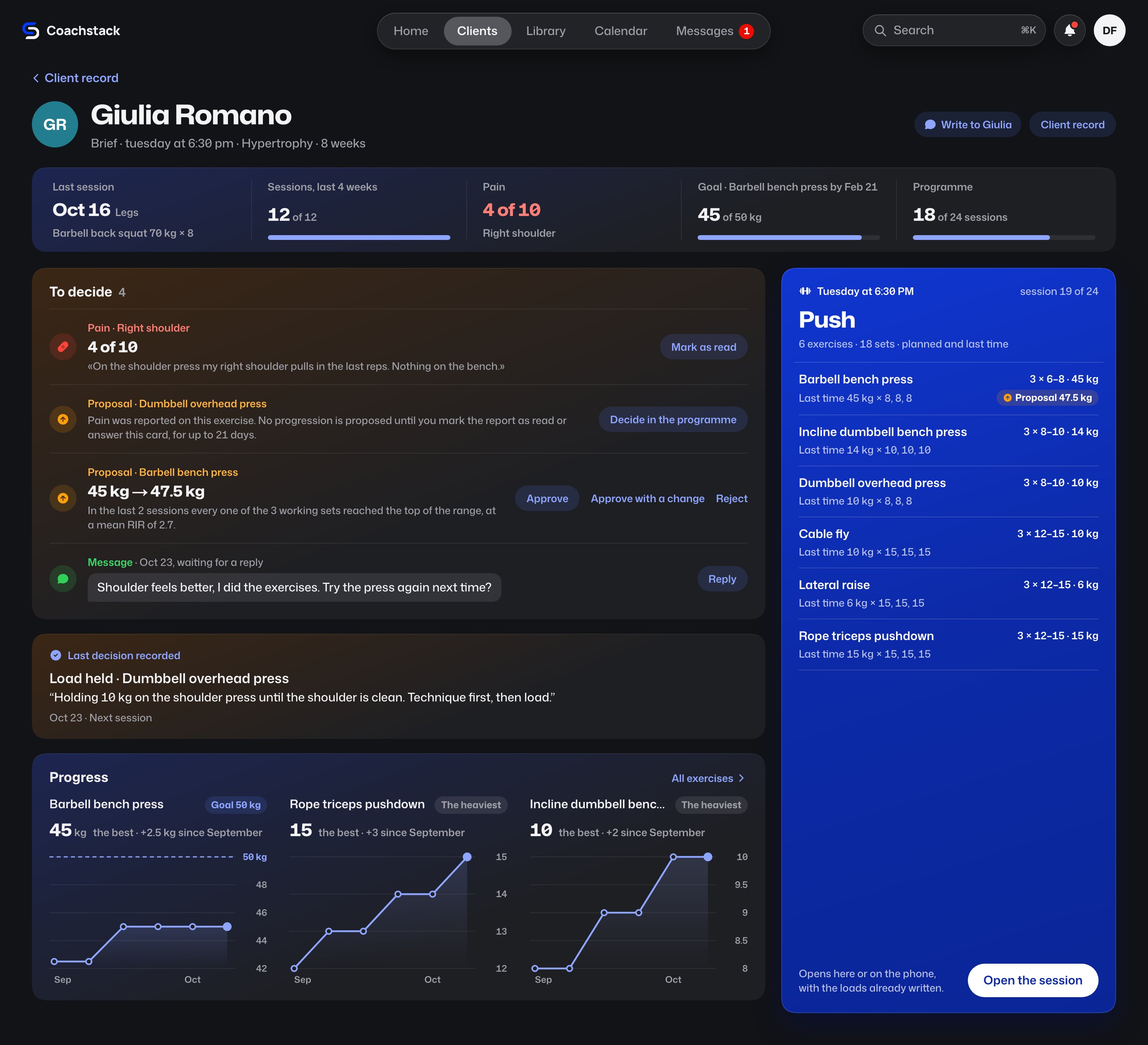
Past ten clients, nobody remembers everything. Last time’s load , the pain that was reported, the decision that was made: Coachstack shows them before every session.
Walk in knowing how it went.
Before every session, one page with everything since last time. It’s built from the sessions, messages, and decisions already recorded: nothing to fill in.
Every decision shapes the next session.
At the end of a session, the decision is recorded in one sentence: what changes, why, and for how long. It comes back in the brief before the next session, and progression proposals respect it while it holds.
I chose to hold the load because it is too soon, and it holds for today only.
Every load increase, calculated and explained.
After every session, Coachstack compares the logged sets with your method’s thresholds and proposes the next step: more load, more reps, or more time. The proposal comes with the sessions it measured and the rule it applied. You approve or reject it with one tap.
Included in the Pro plan.
Barbell bench press
Giulia Romano · Hypertrophy · 8 weeks
45 47.5kg
In the last 2 sessions every one of the 3 working sets reached the top of the range, at a mean RIR of 2.7.
In the gym, you log one-handed.
Today’s load is already filled in.Prescribed by the coach, next to last time’s sets.
One press logs the set.The rest timer starts on its own, and the next set is ready.
Without a signal, the session goes on.Sets stay on the phone and sync when the signal returns.
The coach follows the same session.From a tablet or a phone, in the gym or remotely: every set arrives as soon as it is logged. If both values arrive together, the coach’s counts.
For your clients, an app that matches your work.
Clients join from the link you send them and open Coachstack in their phone’s browser: nothing to install, nothing to pay. They find the day’s session with your notes, log their sets even offline, and watch their loads go up, exercise by exercise.
- The programThe whole block, week by week, and every session one tap away.
- TodayThe day’s session and everything around it: pain, goal, appointment, weight.
- ProgressExercises, body, and training: every load, and how much it has increased.
Start from the programs you already have.
Upload the Excel or CSV file, or paste the cells from your spreadsheet. Exercises, sets, and rests land in place, in a draft to check before you assign it. The same goes for your client list.
A row that could be more than one exercise stays marked, and the choice is yours.
Pick the plan that fits.
Same Coachstack, more room as your work grows. Yearly billing gives you two months free. These are the planned launch prices: there’s nothing to pay during the beta.
Essential
Get your coaching in order.
- Import your clients and programs
- Clients, programs, and progress
- Brief, session, and debrief
- Calendar, check-ins, and messages
- Client portal with offline workouts
Pro
RecommendedProgressions, worked out from your sessions.
- Everything in Essential, plus
- Priority: who needs you, and why
- Progression proposals
- A program-writing assistant
- Session adaptations
Studio
Grow without losing your method.
- Everything in Pro, plus
- Team, roles, and assignments
- Your method, shared across coaches
- Analytics for the whole studio
- Advanced automations
Coachstack becomes your product.
Your domain, your name, your colors. To the client, the brand is yours.
- Your domain, not a Coachstack one
- Client portal under your brand
- Your logo, colors, and typeface
- Every update, under your name
 app.northfield.fitNorthfield#2F6B57Instrument Sans
 my.ironbark.fitIronbark#B0452FIBM Plex Sans
 train.kinetiklab.fitKinetik Lab#2D4A8AArchivo
Three example studios. The typefaces are three of those available.

Try Coachstack with your clients.
Beta access is open. Your account is created from the link sent to your email, with no invitation required.
Your email address is used to create your account and sign in. What we collect.
- Join during the beta and keep the launch price for your first year of subscription.
- Loads never change on their own: a proposal stays a proposal until you approve it.
- Every screen on this page is the product as it is today.
Before you leave your email.
Didn’t find your answer?
I’ve used Excel for years. Why switch?
A spreadsheet keeps the program, not what happens in the session. In Coachstack, logged sets, reported pain, and decisions stay with the client and come back in the brief before the next session. Existing programs import from the file or by pasting the cells.
What can I bring in from another tool?
Programs and clients, from an Excel or CSV file or by pasting a range copied from your spreadsheet. Exercises, sets, and rests land in place, in a draft to refine before you assign it. Photos, scanned PDFs, and workout history are not imported.
My clients aren’t comfortable with apps.
They install nothing: they open the link in their phone’s browser. On the workout screen the load is already filled in, and one press logs the set. Training together, the coach logs from their own phone.
What does Coachstack not do?
It doesn’t handle payments, meal plans, or video calls, and it isn’t a store app yet. It does one thing: plan, record, and adapt your clients’ training.
Do I need to install anything?
No. Coachstack runs in the browser, on computer and phone. The workout screen logs even without a connection: sets stay on the phone and sync when the signal returns.
Who decides a load increase?
The coach. Coachstack calculates the next step from the logged sessions and presents it as a proposal, with the evidence: how many sessions were measured, which rule was applied, and why that step. No load changes until the coach approves.
Can the proposal rules be changed?
Yes. When a proposal is made, when none is, and how big a step is depend on fourteen thresholds in the coach’s settings. Each proposal carries the rule it came from, with the thresholds of that moment: changing them doesn’t rewrite anything already proposed.
What if coach and client log the same set?
There is one session. If both values arrive together, the coach’s counts, and the set records who entered it: the client sees it next to the number.
What does a client need to get in?
Their coach’s link. They create an account with email and password and open Coachstack in the browser. Nothing to install and nothing to pay: the subscription is the coach’s.
Does a client see their own progress?
Yes. For each exercise they see a line of their best set in every session, with every set beneath it. They also see their weight, the measurements they log, and their closed sessions, each as it was that day.
Who reads what a client writes?
Their coach. The data sits on servers in Europe, and Coachstack support has no access to pain reports, notes, messages, documents, or measurements. The privacy notice describes in full what is collected and how.
What counts as a client?
Every client on your list, except finished and archived ones. A client who pauses for a month still counts, because their data stays available.
What if my clients go past the plan’s capacity?
You add capacity, more clients or more coaches, and pay only for the increase, without moving up a plan for a few extra people.
How do I get in today?
Request access at the bottom of this page: the link sent to your email creates your account, as a coach or as a coach’s client. There’s nothing to pay or cancel during the beta, because the product has no payments yet. The terms will be published before any charge.
What happens when the beta ends?
The end of the beta is announced at least 30 days in advance. Beta coaches pay the launch price for their first 12 months of subscription. Without a plan, the studio is read-only for 60 days, with data export, and is then closed.